One workspace for writing, tracking, funders, and people. Grant management for small nonprofits walks through the same picture in more detail.
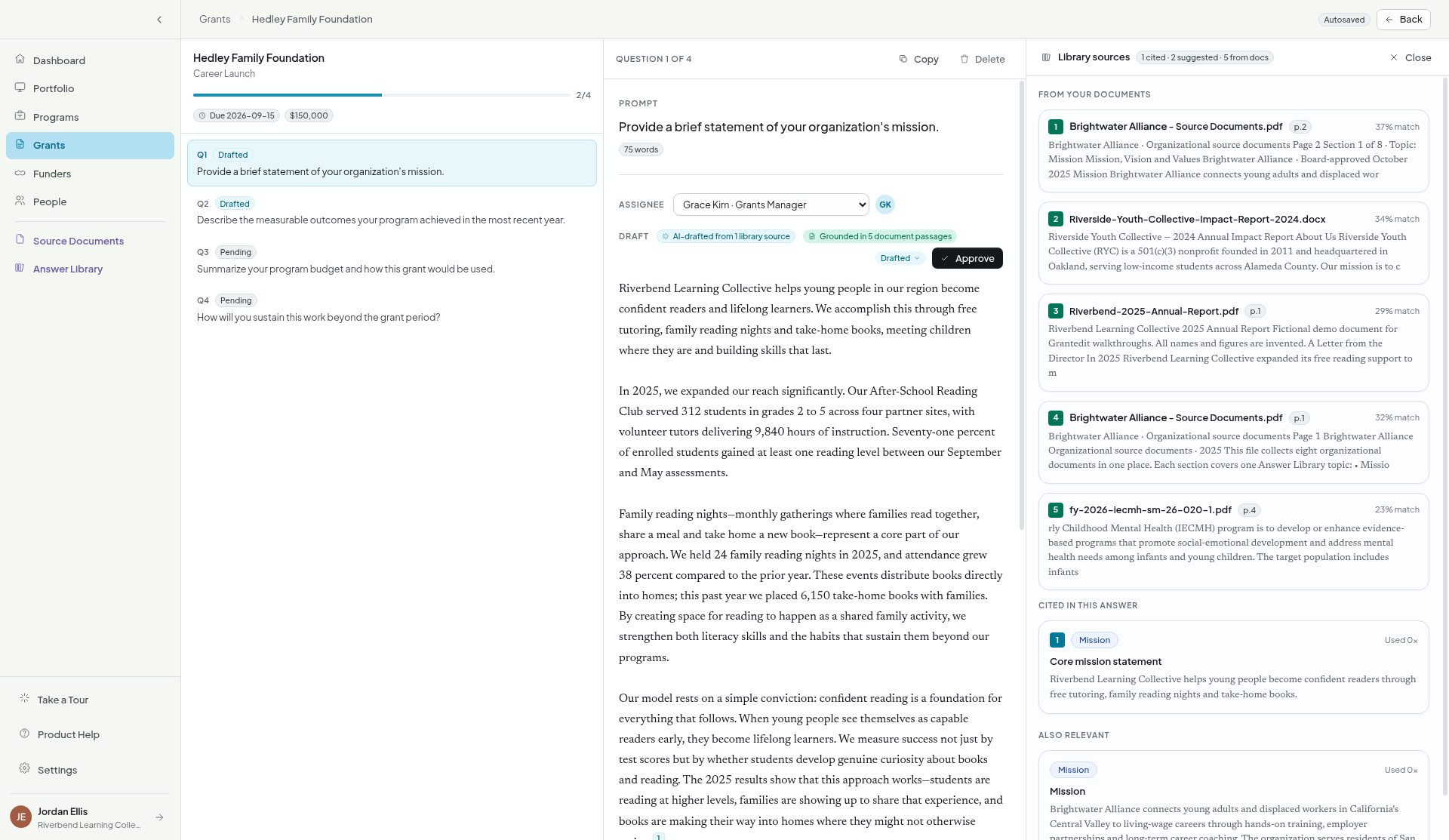
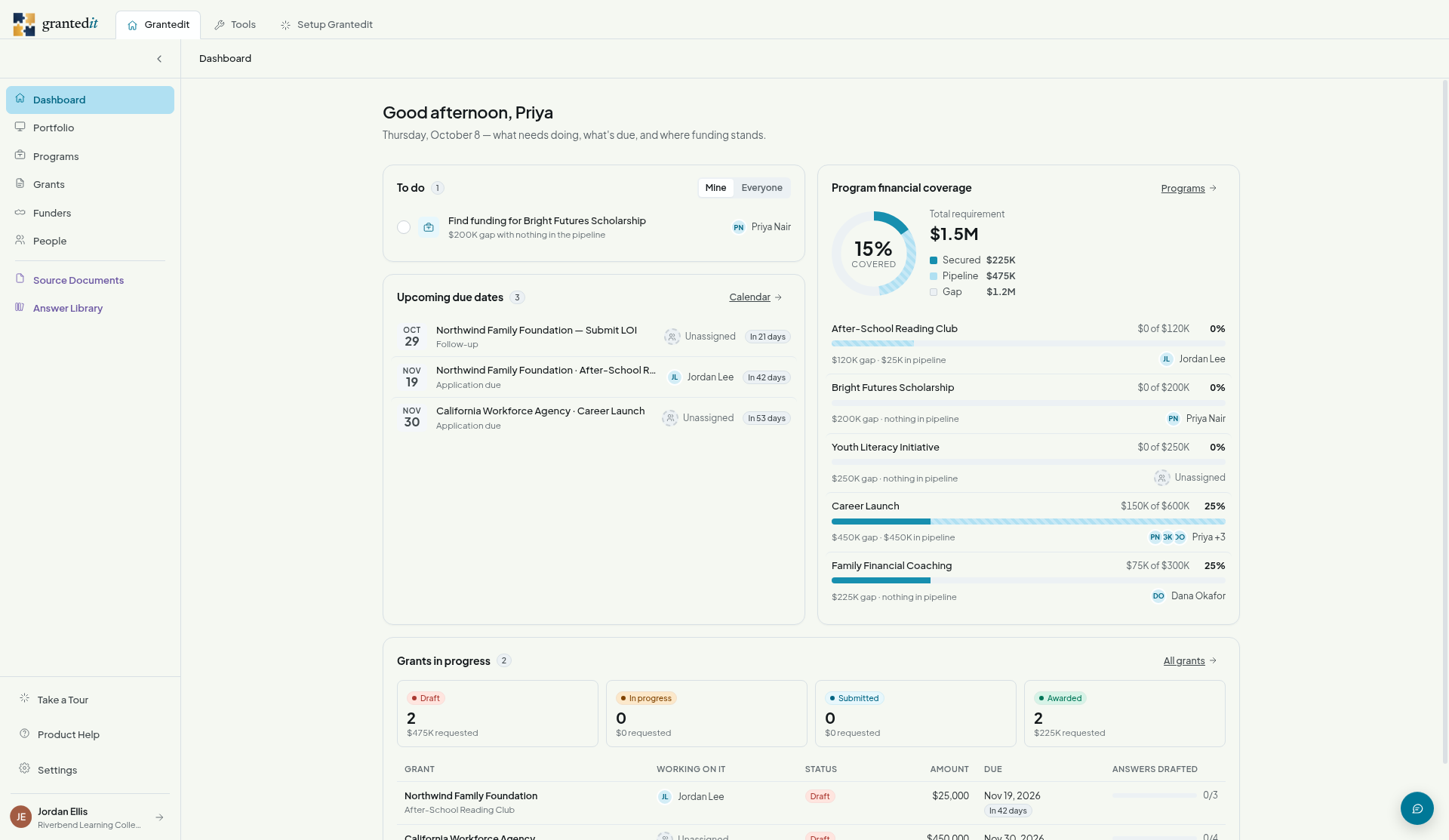
Track each grant from first questions through draft, submit, and award. Deadlines, owners, and stage sit next to the writing — not in a separate spreadsheet.
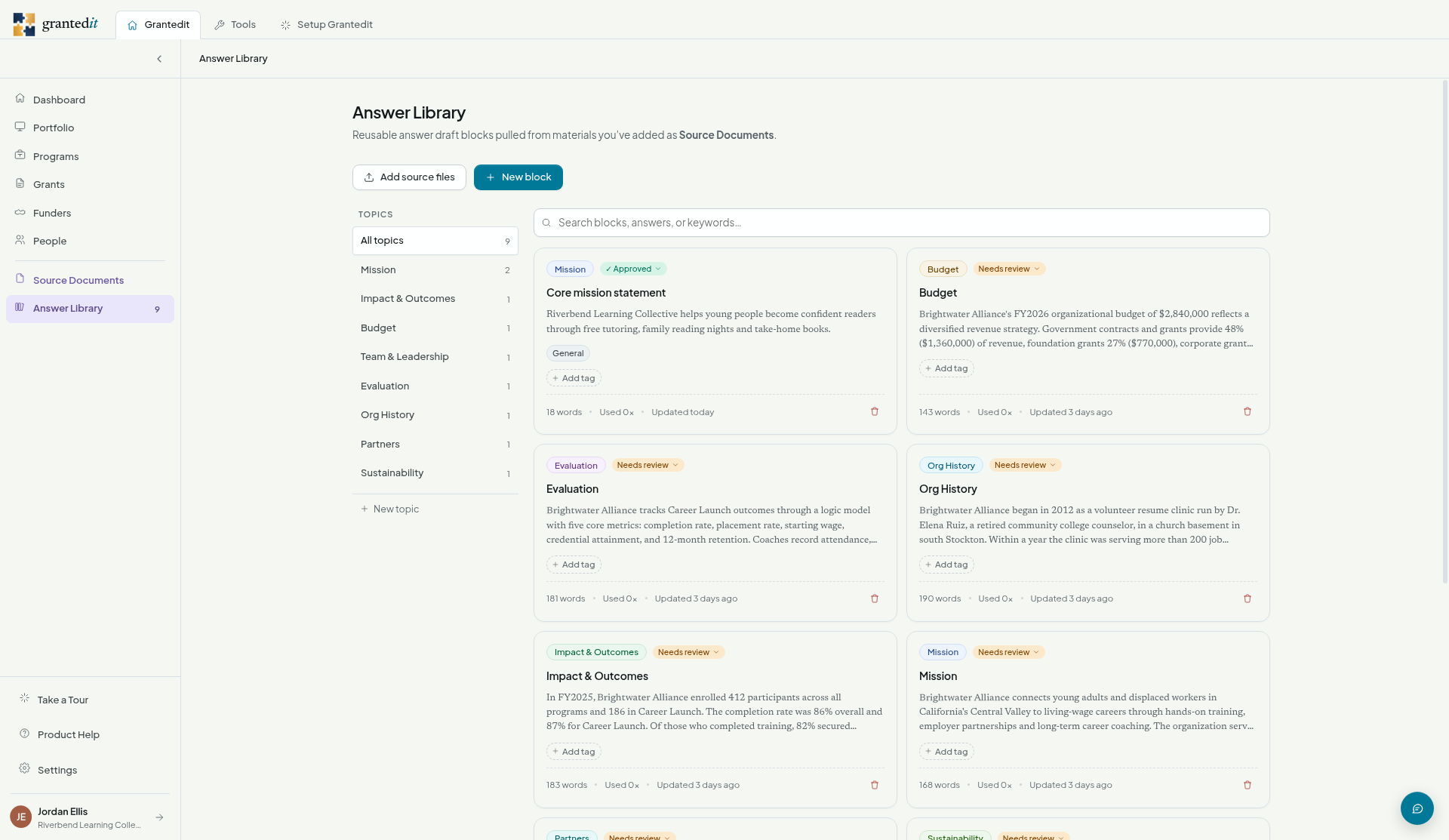
Draft new responses from an Answer Library built out of past grants, program data, and org-wide documentation — mission statements, impact data, budget summaries — approved, tagged and ready to drop in.
Grantedit drafts responses to each funder's questions from the approved blocks in your Answer Library, not from the open internet. Every claim points back to its source.
A simple funder CRM for contacts, notes, and every call, email, and site visit. Set a relationship status and a dated next action, so follow-ups don't live in one person's inbox.
Record your team, put people on programs and grants, and see how each person's time is split. Every card shows light, balanced, or over capacity, so a busy deadline doesn't quietly overload someone.
Keep each grant budget honest: log expenses against a program by category and by who spent them. See total spent, what's remaining, and which programs are over budget.
Starter is free for one grant in progress. Request access to get started.

Grantedit drafts responses to each funder's questions from the approved blocks in your Answer Library, not from the open internet. Every claim points back to its source. Reviewers can check it in seconds.
Past applications, annual reports, impact data and budgets. Grantedit reads them so you don't have to retype.

Documents become reusable, approved answer blocks — tagged and organized by topic, not by grant.

AI drafts each funder question from approved blocks only, with every claim linked to its source.

See the grant pipeline, upcoming due dates, and funding coverage per program on one dashboard.

Straight answers on fit, pricing, AI drafts, access, and privacy — for Google search and AI answer engines.
Grantedit keeps all of your grant work in one place: your programs, your team, your budgets, your funders and every application. It also helps you write. Grantedit uses your own documents and past answers to draft responses to a funder's questions, so you aren't starting from a blank page each time.
Nonprofits that apply for grants, from a single grant writer to a whole development team. If you keep track of deadlines in spreadsheets, rewrite the same mission statement for every funder, or lose information when someone leaves, Grantedit is built for you.
No. If you can use email and a word processor, you can use Grantedit. A short setup guide and a guided tour walk you through your first grant.
Grantedit is currently invitation-only. Fill in the form on our Request access page (live: grantedit.com/request-access), and we'll reply within 1 business day with an invitation for your organization.
You can start your first grant on day one. Most of the setup is uploading documents you already have, such as an annual report, a past application or a budget, and filling in your organization's basic details. The more you add, the better your drafts get.
PDF, Word (.docx), plain text and Markdown files up to 25 MB each. Older .doc files need to be saved as .docx first. You can also upload a funder's application form, and Grantedit will pull the questions out for you, or paste them in yourself.
Plans are priced by number of users. All users get all features on their plan.
Yes. Starter is free with no trial period and doesn't need a credit card. It's a good way to try Grantedit on a real grant before you decide to upgrade.
If you work on one grant at a time, start with Starter. Once you have more than one application going at once, or need more AI drafts or storage, move to Multi-Grant. If you're a larger organization or manage grants for several organizations, contact us about Enterprise.
On Multi-Grant, you pay for each person in your workspace. If someone leaves and you remove them, you stop paying for them, and the unused part of that month is credited to your next invoice.
Any application that hasn't been declined or archived. Once you archive a finished grant, it no longer counts, so you can start another.
Yes. You can upgrade, change your card or cancel from Settings → Billing. If you cancel, your paid plan lasts until the end of the period you've paid for. After that you move to Starter.
Nothing is deleted. You keep every grant and document. You just can't add new ones until you're back under the Starter limits or upgrade again.
By credit or debit card, through Stripe, a widely used payment company. You enter your card on Stripe's secure page, and Grantedit never sees your card number.
It writes a first draft for each question, and you stay in charge. You read it, edit it and approve it before it goes anywhere. Think of it as a fast assistant who has read all of your documents, not a replacement for your judgment.
From your organization only: the documents you upload, the approved answers in your Answer Library, and your organization's profile. It doesn't search the internet.
It's instructed not to. If a number, name or date isn't in your documents, it writes around the gap or flags it for you to check rather than guessing. Each draft shows which of your sources it used, so you can confirm any claim quickly.
Your collection of approved answers to the questions funders ask again and again: your mission, your history, your impact numbers, your team. Write a good answer once, save it, and reuse it in every application. Grantedit can also build library entries from your documents for you to review.
Grantedit is set up to write in a clear, plain, professional voice and to avoid the filler phrases AI tools are known for. You can also say what you want, such as "shorter" or "focus on our youth program", before it writes.
Each answer has a copy button. Copy it and paste it into the funder's online form or your own document.
Claude, made by Anthropic, one of the leading AI companies. Grantedit never uses your information to train AI, and Anthropic's business terms don't allow it to train on what we send through its API.
Yes. A workspace Owner invites them by email from Settings → Team & access. They'll get a link to join your organization's workspace, where everyone works from the same grants, documents and Answer Library.
Yes. Each person is an Owner or a Member. Members can view, add, edit and archive work. Only Owners can permanently delete things, invite or remove people, and manage billing. Everyone in the workspace can see all of its content, so invite people you'd trust with all of it.
An Owner removes them, and their access ends straight away. The work they did stays, with their name on it, so nothing is lost when staff change.
Deleted grants, programs, people, documents and library answers go to Trash for 30 days, and anyone can restore them from Settings → Trash. Grantedit also keeps earlier versions of your answers and organization profile, so overwritten text can be brought back.
Yes. Your information is stored in a professional, independently audited data center in the United States. It's encrypted both while it's stored and while it travels between your computer and Grantedit.
No. Each organization has its own private space, like a locked safe-deposit box at a bank. Every time anyone asks for something, Grantedit checks that they belong to your organization. If they don't, they get nothing.
Grantedit never uses your information to train AI. Our drafting provider, Anthropic, doesn't allow training on what we send through its business API.
Only what it needs to write each answer. Grantedit removes tax numbers (EIN, DUNS and UEI), email addresses and phone numbers from your organization profile before it's sent to the AI. Passages from the documents you upload are sent as they are written, so if a report or 990 contains numbers you'd rather the AI didn't see, remove them before you upload it.
Please don't upload medical records or private details about individual clients. Grantedit is designed for the documents grant writers work with, such as reports, budgets and past applications, not for case files.
Yes. You can download any document you uploaded and copy any answer at any time. For a full export, or to have your workspace and all its data deleted, an Owner can email support@grantedit.com or use the Share feedback button in Grantedit, and we’ll handle it within 30 days.
Inside the app, the Setup guide and a guided tour walk you through the basics. Step-by-step articles are in our help center at docs.grantedit.com.
Use the feedback button inside Grantedit. You can attach a screenshot, and it comes straight to our team. You can also email us at support@grantedit.com.
Yes. Enterprise includes dedicated onboarding: personal help getting your workspace and your team set up. Contact us to talk about it.
Plans are priced by number of users, not programs. All users get all features.
Short reads on the grant work Grantedit is built around.
Pipeline, Answer Library, funder CRM, and people in one workspace.
Read the guide →Grant tracking without a spreadsheetStages, deadlines, and owners sit next to the writing.
Read the guide →A logic model template you can copyInputs, activities, outputs, and outcomes in plain language.
Read the template →All guides and templatesThe full list, plus Trust and Security and pricing.
Browse resources →